How to set up maintenance reminders
Never forget battery changes, yearly tests or any repeat service.
Add a reminder
- Open the client's page and find the Maintenance reminders card.
- Press + Add.
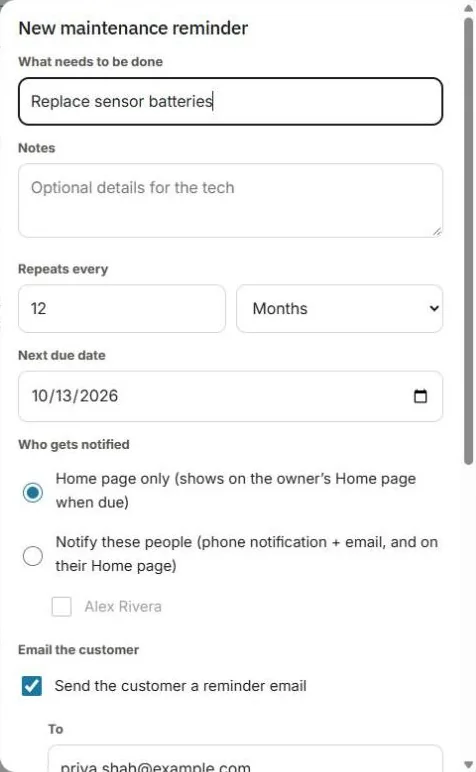
- Type What needs to be done, for example "Replace sensor batteries". Add optional details for the tech.
- Set Repeats every (for example 1 year) and the Next due date.
- Choose Who gets notified:
- Home page only: it shows on the owner's Home page when due.
- Notify these people: they get a phone notification and email, and see it on their Home page.
- Optional: check Send the customer a reminder email. Choose when to send it, add up to 5 more emails, and add a note, for example "The visit takes about 30 minutes."
- Press Add reminder.
When it's due
It shows under Maintenance due on Home. Choose:
- Create ticket: makes a job for the visit.
- Mark done: moves the next due date ahead by the repeat time.
- Email customer now.
Tip: Going on a break? Check Paused on the reminder. No reminders go out until you turn it back on.
Was this guide helpful?
Still stuck? Inside JobBills, press the round ? button to ask the help chat, or email [email protected].